Comoji vs Apple Text Replacements
Comoji adds free Slack-style :emoji: autocomplete to every app on your Mac.
macOS Text Replacements (System Settings › Keyboard › Text Replacements) is the built-in way to swap typed text for other text, including emoji. It is free, it is already on your Mac, it syncs to your iPhone and iPad over iCloud, and it asks for no permissions at all. For a handful of favourites it is genuinely the right answer, and this page is not going to pretend otherwise.
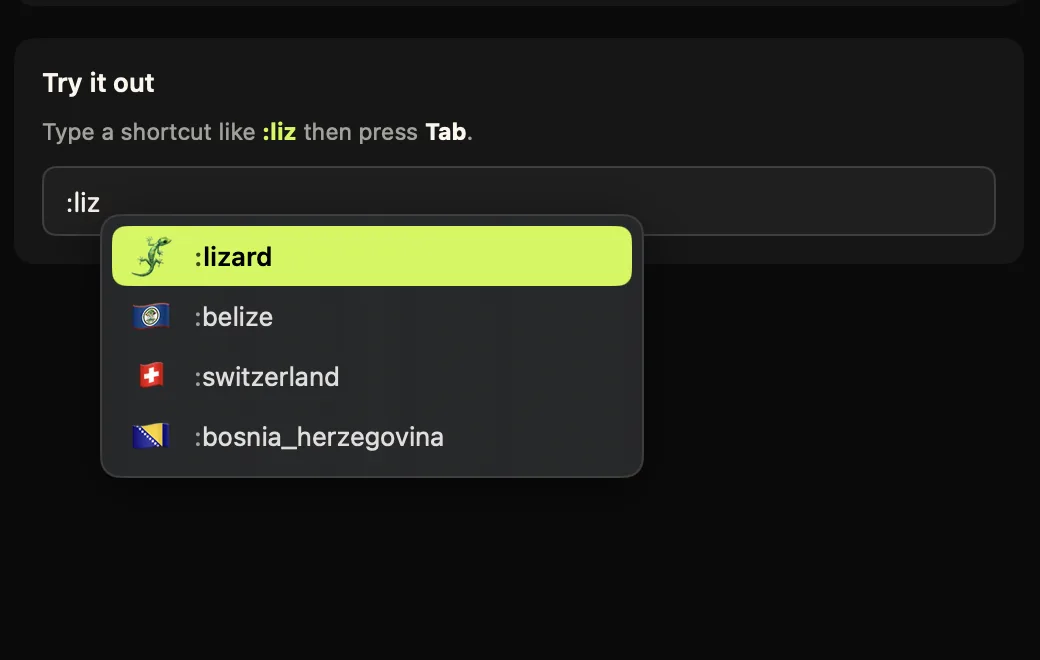
The difference is how each approach scales, and where each one actually fires. Text Replacements asks you to define every emoji by hand and remember the exact trigger you chose. Comoji gives you live autocomplete over the whole set: type a colon and a few letters, pick from ranked matches, press Tab.
Feature comparison
| Feature | Comoji | Text Replacements |
|---|---|---|
| Built into macOS, nothing to install | No | Yes |
| Asks for no permissions | No | Yes |
| Live autocomplete + preview | Yes | No |
| Full emoji set out of the box (1,870) | Yes | Manual entries |
| Slack & Discord aliases (:joy:, :+1:) | Yes | If you add them |
| Ranking by recent use | Yes | No |
| Skin-tone selection | Yes | No |
| Works in Electron apps & most web fields | Yes | Varies |
| Per-app disable list | Yes | No |
| iCloud sync across Mac, iPhone, iPad | No | Yes |
| System-wide sticker & GIF pickers | Yes | No |
| Price | Free | Free |
How Text Replacements actually works
You add a pair: a Replace string like :fire: and a With string like 🔥. macOS then substitutes it as you type, when you finish the word: a space, a punctuation mark or Return commits it. There is no popup, no list, no preview and no discovery: substitution only happens on an exact match with something you typed into that table yourself.
Two practical consequences. First, coverage is per-entry: 20 emoji means 20 rows you created and 20 triggers you remember, and there is no way to search "what was that one for the party popper?" at the moment you need it. Second, coverage is per-app in a way you do not control. Text Replacements works in text fields that use Apple's standard text system, so Messages, Mail, Notes and Safari are fine, while many Electron apps, some browser text areas and Terminal do not honour it. When it silently does not fire, there is nothing to configure.
Comoji inverts both. The full set of 1,870 emoji is searchable from the first keystroke with Slack and Discord aliases already attached, so :+1 and :thumbsup both find 👍 without you defining anything. And because it works at the keyboard level rather than through the text system, it fires in the same fields plus most of the ones Text Replacements misses, with a per-app and per-site disable list for the places you would rather it stayed quiet.
Pricing, permissions and coverage
Pricing
- Comoji
- Free, and free in the plain sense: all features included, no account, no trial clock. Optional Supporter is $1.99 once to remove promotions. The download is a signed and notarized DMG.
- Text Replacements
- $0, permanently. It is part of macOS, iOS and iPadOS. There is nothing to buy, nothing to download, no account beyond the iCloud one you already have, and no vendor who can change the terms later. On price alone, nothing beats it.
Permissions it asks for
- Comoji
- Accessibility and Input Monitoring. Input Monitoring lets Comoji notice that you typed
:fire; Accessibility lets it find the focused field and caret so the popup lands in the right place, and type the emoji back. Secure password fields are ignored. Those are the two most invasive permissions macOS has, so /security lists every host the app can contact and gives you the Terminal commands to check the claim yourself. - Text Replacements
- None. This is the strongest argument for it and it deserves to be stated without hedging: Text Replacements is Apple's own code running inside the text system, so there is no Accessibility prompt, no Input Monitoring prompt, and no third-party app with access to your keystrokes. If you are on a managed Mac that forbids those grants, or you simply do not want to give them, this is the option that needs nothing.
Platforms
- Comoji
- macOS 13 Ventura or later, Apple silicon and Intel. Mac only: there is no iPhone, iPad or Windows version, and nothing syncs between machines.
- Text Replacements
- macOS, iOS and iPadOS, with entries syncing over iCloud. Add
:fire:on your Mac and it works on your iPhone a moment later. Comoji is Mac-only, so if you want the same shortcuts on your phone, this is the only option on this page that gives you them.
Apps and fields it works in
- Comoji
- Any standard text field: Messages, Mail, Notes, Slack, browsers, and most editors. A per-app disable list turns it off in named apps, and a per-site list turns it off on domains like
github.com(subdomains included) where the site already has its own:emoji:handling. - Text Replacements
- Apps that use Apple's standard text system: Messages, Mail, Notes, Safari, TextEdit and most native apps. Coverage is unreliable in Electron apps (Slack, VS Code, Discord and similar), some web text areas, and Terminal, where it usually just does not fire, with no setting to change.
Text Replacements facts checked on against the sources below. Third-party apps change their pricing and features, so treat the vendor’s own site as the last word.
Using both is a perfectly good answer
These two are not mutually exclusive and plenty of people run both: Text Replacements for text snippets and the handful of emoji you want on your iPhone too, Comoji for the :emoji: firehose on the Mac. They do not conflict, because Comoji only reacts to its own trigger token.
If you want the longer treatment, including how to migrate a table you have already built, we wrote it up: Text Replacements vs emoji autocomplete.
Which one should you pick?
Pick Text Replacements if…
- You use a small, stable set of emoji and do not mind typing the exact trigger.
- You want the same shortcuts on your iPhone and iPad, not just your Mac.
- You cannot or would rather not grant Accessibility and Input Monitoring to a third-party app.
- You are on a managed Mac where installing utilities is not an option.
- You mainly type in Apple's own apps, where it reliably fires.
Pick Comoji if…
- You want the whole emoji set searchable without building a table first.
- You want discovery: type
:partand see 🎉 🥳 🎊 rather than having to already know the name. - You type in Slack, VS Code, Discord or web apps where Text Replacements tends not to fire.
- You want skin tones, recent-use ranking, and system-wide GIF and sticker search.
The verdict
If you only use a couple of emoji and do not mind maintaining them, Apple Text Replacements are free, built in, permission-free and sync across your devices. There is no reason to add anything.
If you want Slack- and Discord-style speed across your whole emoji library, with discovery, ranked suggestions, skin tones, coverage in the apps the built-in feature misses, and no manual table to babysit, Comoji is the better fit. Many people use both.
Frequently asked questions
Do I need to grant any permissions to use Text Replacements?
No. Text Replacements is a built-in macOS feature with no permission prompt, and it syncs across your devices via iCloud. Comoji needs Accessibility and Input Monitoring to notice a colon shortcut anywhere and insert the emoji back into the field.
Can Text Replacements show me emoji I have not already set up?
No, only what you have typed in yourself, one alias per emoji, in System Settings. There is no search or discovery: if you have not added :party as a replacement, typing it does nothing. Comoji covers the whole emoji set out of the box, so :part surfaces 🎉 🥳 🎊 without you building a table first.
Do Text Replacements work the same everywhere?
Mostly, but not universally: some apps, including Slack, VS Code, Discord and some web apps, do not always trigger system text replacement. Comoji works at the keyboard level rather than through the OS text-replacement API, so it reaches those apps too.
Try Comoji
macOS 13 Ventura or later · Free · Signed & notarized · No account.