Comoji vs Raycast
Comoji adds free Slack-style :emoji: autocomplete to every app on your Mac.
Raycast is a powerful, popular Mac launcher with emoji search built in. You hit Raycast's hotkey, type a few letters, press Return, and the emoji goes into the app you were in, much faster than the system picker. If you already live in Raycast, it is a good way to get emoji without leaving your flow for long.
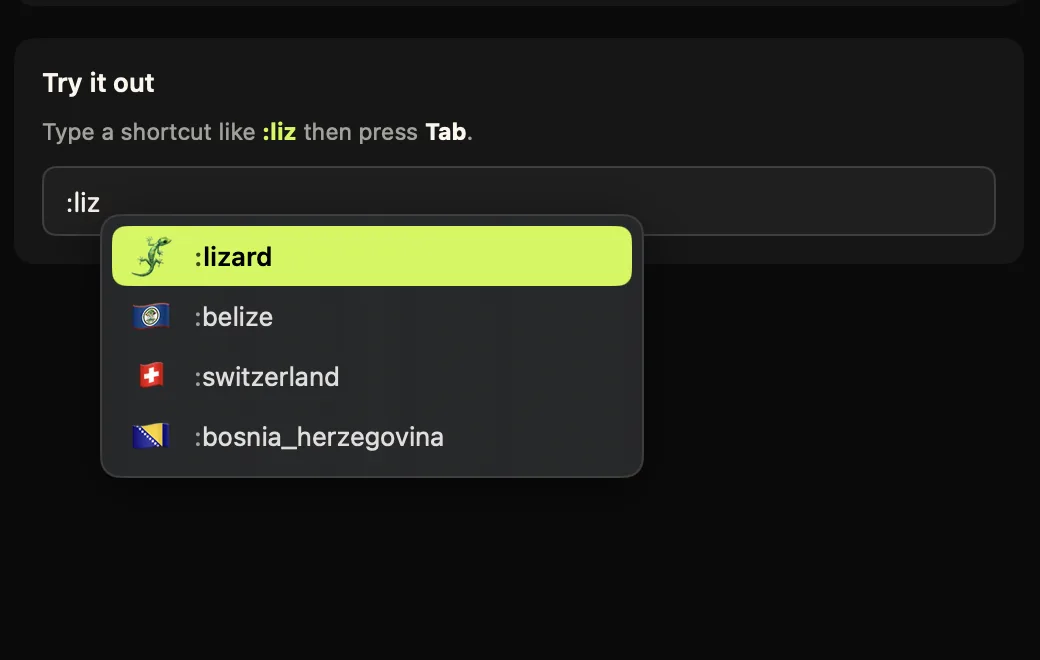
The core difference is *where* the typing happens. Raycast is launcher-invoked: you leave your text field, search in an overlay, and come back. Comoji is inline: you type a colon token like :liz right where you are already writing, pick from a popover next to the caret, and press Tab. No hotkey, no overlay, no focus change.
The other honest difference is scope. Raycast is a whole productivity suite (clipboard history, window management, extensions, AI) and emoji is one command inside it. Comoji does emoji, stickers and GIFs and nothing else. That shapes the price, the permissions, and the answer to "which should I install?".
Feature comparison
| Feature | Comoji | Raycast |
|---|---|---|
| Inline colon :emoji: autocomplete as you type | Yes | No |
| Works without leaving your text field | Yes | No |
| Emoji search by name / keyword | Yes | Yes |
| Symbols as well as emoji | No | Yes |
| Skin-tone selection | Yes | Yes |
| Recent-use ranking | Yes | Yes |
| Custom trigger key | Yes | Hotkey / alias |
| Per-app & per-site disable list | Yes | No |
| System-wide sticker & GIF pickers | Yes | No |
| Clipboard history, window mgmt, extensions, AI | No | Yes |
| Also on iOS / Windows | No | Yes |
| Price for the emoji feature | Free | Free tier |
How Raycast emoji search actually works
Raycast's root search opens on a global hotkey (⌥Space by default). From there the Search Emoji & Symbols command filters emoji and symbols as you type, remembers what you use, and inserts the result into whatever app was in front. You can give that command its own hotkey or alias so it is one keystroke away rather than two, which is what most heavy users do.
The important mechanic is the focus round-trip. Raycast is an overlay window: it takes focus, you search there, and it hands focus back with the emoji inserted. It is fast, but it is a mode. Comoji never takes focus at all: the popover is a hint next to your caret and every keystroke still goes to the app you are typing in, so :li Tab never interrupts a sentence.
Which one wins depends on what you are doing. For one emoji at the end of a message, the difference is small. For a message with three or four, or for anything you type at speed, the inline model avoids repeatedly leaving and re-entering the field. And in Messages specifically, Comoji adds /sticker and /gif pickers, which a launcher does not attempt.
Pricing, permissions and coverage
Pricing
- Comoji
- Free, and free in the plain sense: all features included, no account, no trial clock. Optional Supporter is $1.99 once to remove promotions. The download is a signed and notarized DMG.
- Raycast
- Free tier, and emoji search is in it, you do not need to pay Raycast anything to use its emoji command. If you want the rest: Raycast Pro is $10/month billed monthly, or $8/month billed annually, with two higher AI tiers on top, Pro+ at $20/month and Pro Max at $50/month (monthly billing; both are cheaper billed annually). Teams are $15/user/month monthly, $12/user/month annually, with a free team tier and custom Enterprise pricing. Students get 50% off Pro.
Permissions it asks for
- Comoji
- Accessibility and Input Monitoring. Input Monitoring lets Comoji notice that you typed
:fire; Accessibility lets it find the focused field and caret so the popup lands in the right place, and type the emoji back. Secure password fields are ignored. Those are the two most invasive permissions macOS has, so /security lists every host the app can contact and gives you the Terminal commands to check the claim yourself. - Raycast
- Accessibility, prompted on first run and needed for global hotkeys, inserting text into other apps, and snippet expansion. That is the same class of access Comoji's Accessibility grant gives it, so neither app is permission-free: the difference is that Comoji also needs Input Monitoring, because noticing that you typed
:firein someone else's text field requires it, whereas a launcher only has to notice its own hotkey.
Platforms
- Comoji
- macOS 13 Ventura or later, Apple silicon and Intel. Mac only: there is no iPhone, iPad or Windows version, and nothing syncs between machines.
- Raycast
- macOS 13 or later, plus iOS and Windows apps and a browser extension. If you want the same tool and the same muscle memory across machines and phones, that is a real advantage and Comoji has no answer to it.
Apps and fields it works in
- Comoji
- Any standard text field: Messages, Mail, Notes, Slack, browsers, and most editors. A per-app disable list turns it off in named apps, and a per-site list turns it off on domains like
github.com(subdomains included) where the site already has its own:emoji:handling. - Raycast
- Anywhere Raycast can insert into the frontmost app, which in practice is most text fields. Because it is invoked rather than ambient, there is nothing to disable per app or per site: it never fires unless you press the hotkey, which is its own kind of "works everywhere".
Raycast facts checked on against the sources below. Third-party apps change their pricing and features, so treat the vendor’s own site as the last word.
They are not really competing for the same slot
Worth saying plainly: these two coexist well. Raycast replaces Spotlight; Comoji replaces the Control-Command-Space emoji picker. Running both is normal, costs nothing, and means the hotkey is there when you want to browse symbols while colon autocomplete handles the emoji you already know the name of.
If you would rather read the long version, with the workflow compared keystroke by keystroke, we wrote one: Raycast emoji picker alternative.
Which one should you pick?
Pick Raycast if…
- You already use Raycast as your launcher, and one more command there is free and immediate.
- You want clipboard history, window management, extensions and AI from the same app.
- You want the same tool on iOS or Windows as well as your Mac.
- You search for symbols (arrows, maths, punctuation) as often as emoji.
- You would rather nothing watch your typing at all: a launcher only reacts to its own hotkey.
Pick Comoji if…
- You want emoji inline, with no hotkey and no overlay stealing focus mid-sentence.
- You send several emoji per message and the focus round-trip adds up.
- You want system-wide
/gifand/stickerpickers. - You want per-app and per-site control over where autocomplete is active.
- You do not want a launcher at all, or you already have one you like.
The verdict
Choose Raycast if you want the broader suite, or you are already in it every day. Its emoji search is a genuinely good bonus on top of everything else it does, and it costs nothing on the free tier.
Choose Comoji if you want emoji to appear inline as you type, with no hotkey and no context switch out of the field you are writing in, plus system-wide /gif and /sticker pickers, per-app and per-site controls, skin tones and recent-use ranking, all free and processed locally on your Mac. macOS 13 Ventura or later. Or run both; they do not collide.
Frequently asked questions
Can I use Raycast and Comoji together?
Yes, and it is a normal setup rather than a compromise. Raycast is invoked by a hotkey and replaces Spotlight; Comoji is ambient and replaces the Control-Command-Space emoji picker. They never fire at the same time, so running both costs nothing and covers both jobs.
Does Raycast's emoji picker cost anything?
No. Emoji search, along with Clipboard History, Quicklinks and window management, is in Raycast's free tier. The $10/month Pro plan (or $8/month billed annually) is for Raycast AI and cloud sync, not for the emoji feature.
Why would I want inline autocomplete instead of a launcher-style search?
A launcher requires a hotkey, a context switch to a search window, and a mouse or arrow keys to confirm, every single time. Comoji's popover appears at your cursor as you type and Tab inserts without leaving the field, which adds up over a day of sending several emoji per message.
Try Comoji
macOS 13 Ventura or later · Free · Signed & notarized · No account.