How to Make Emoji Text Replacements on a Mac, and Their Limits
Comoji adds free Slack-style :emoji: autocomplete to every app on your Mac.
macOS has a built-in way to turn typed text into other text: Text Replacements. You can absolutely use it to make :fire: become 🔥, for free, with nothing to install. This guide walks through setting that up, then shows where it stops scaling, from a handful of emoji to your whole library. (Weighing Text Replacements against Comoji feature by feature? Comoji vs Text Replacements is the side-by-side, with permissions and app coverage.)
How to set up emoji Text Replacements
It’s worth knowing how to do this even if you end up wanting more, because for a few favorites it’s genuinely fine:
- Open System Settings › Keyboard › Text Replacements (on older macOS it’s under Keyboard › Text or in the Keyboard preference pane).
- Click the
+button. - In Replace, type the trigger, e.g.
:fire:. - In With, paste the emoji, 🔥, (open the emoji picker with
Control-Command-Spaceto grab it). - Press
Return. Repeat for every emoji you want.
Your entries sync across your Apple devices over iCloud, so a replacement you add on the Mac shows up on your iPhone too. macOS swaps in the emoji once you finish the trigger and type a following space or punctuation.
Where Text Replacements fall down
- You have to add every single alias by hand, there’s no discovery and no starting set.
- There’s no autocomplete or preview; you must remember the exact trigger, character for character.
- A typo in the trigger means nothing happens, with no hint why.
- Managing hundreds of entries in that tiny scrolling list is miserable, and there’s no folder or grouping.
- No ranking, no recents, and no skin-tone handling, every
:thumbsup:is the same default tone. - Sync can lag or conflict; a freshly added replacement sometimes won’t fire until the next sync settles.
How emoji autocomplete works instead
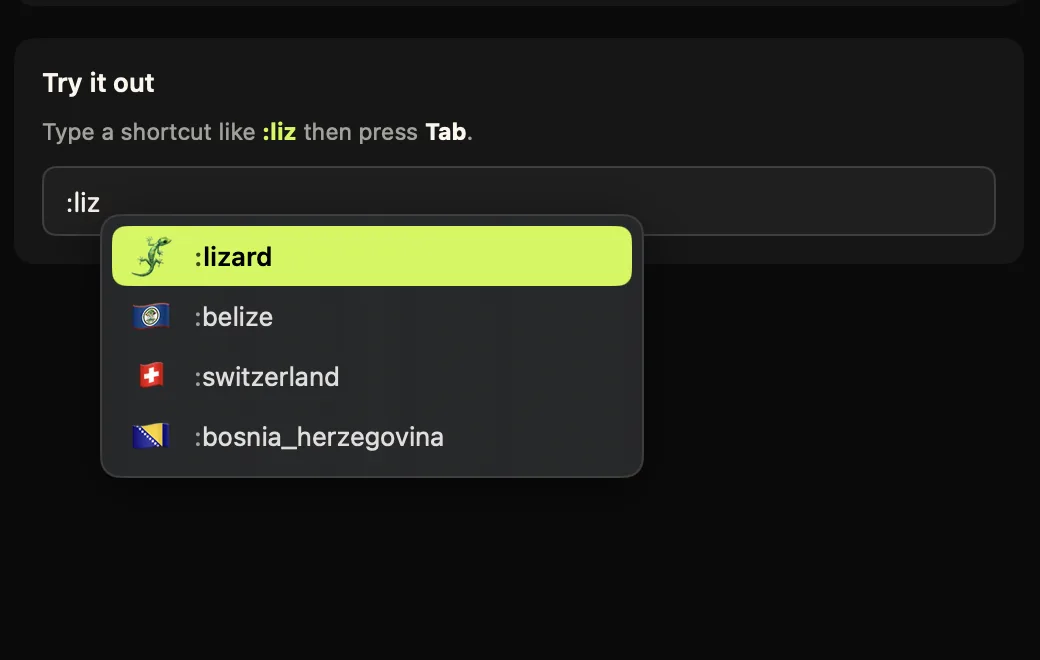
A tool like Comoji flips the model. Instead of memorizing exact triggers, you type a colon and a few letters and *see* the matches: :whis surfaces 🥃 whiskey at the top. You accept with Tab. It ships with the full Unicode emoji set and the Slack- and Discord-style gemoji aliases out of the box, ranks by relevance and recent use, and handles Fitzpatrick skin tones.
Side by side
The short version is below; if you want the row-by-row version, covering iCloud sync, price and each feature in turn, see the full comparison.
- Setup: Text Replacements need one manual entry per emoji; Comoji works for every emoji the moment you install it.
- Discovery: Text Replacements have none; Comoji shows live suggestions as you type, plus a
::browser for the full set. - Forgiveness: a mistyped Text Replacement silently does nothing; Comoji just shows fewer matches and keeps going.
- Skin tones & recents: Text Replacements have neither; Comoji ranks by recent use and lets you pick a tone.
- Reach: both work in most apps; Comoji adds per-app and per-site disabling and a configurable trigger key.
- Privacy: both are local; Comoji additionally ignores password fields and adds no telemetry.
A worked example: your top ten emoji
Say you want the ten emoji you send most. With Text Replacements that’s ten trips through the + button, ten emoji to copy out of the picker, and ten triggers to invent and then remember exactly, :fire: vs :flame:, :thumbsup: vs :+1:, miss the spelling later and nothing happens. With autocomplete there’s no list to build: :fi already shows 🔥 near the top, :+1 shows 👍, and the ones you pick most climb the ranking on their own. The “setup” is just installing the app, and it covers all 1,800-odd emoji, not the ten you had the patience to enter.
What about iPhone and iPad?
This is the real reason to keep some Text Replacements around. They sync over iCloud to your iPhone and iPad, so a :fire: rule you add follows you onto iOS, where Comoji (a Mac app) doesn’t run. If you want the same handful of shortcuts on your phone, set those up as Text Replacements. On the Mac, where you’re typing longer messages and want the full library, autocomplete is the faster tool. They coexist without conflict.
One thing Text Replacements still do better
Text Replacements aren’t just for emoji, they expand arbitrary text snippets (omw → “On my way!”, your address, a support boilerplate) and they sync to iOS. Comoji is focused on emoji, stickers and GIFs and doesn’t try to be a general text expander. So this isn’t strictly either/or, and if snippets are what you need, free text expanders for Mac compares Text Replacements with espanso.
When to use which
If you only ever use a couple of emoji and don’t mind maintaining them, Text Replacements are free and built in. If you want Slack- and Discord-style speed across your whole library, with discovery, ranking and skin tones, autocomplete is the better fit.
The pragmatic answer for most people is both: keep a few Text Replacements for non-emoji snippets and anything you want mirrored to your iPhone, and let Comoji handle the :emoji: firehose on the Mac. Comoji runs on macOS 13 Ventura or later (through macOS 26 Tahoe) and stays out of the way of your existing replacements, the two don’t conflict.
Frequently asked questions
Can macOS Text Replacements insert emoji?
Yes. Add an entry under System Settings › Keyboard › Text Replacements with :fire: in Replace and 🔥 in With, and macOS swaps it in once you finish the trigger and type a space or punctuation. It is free, built in, and for a few favorites it is genuinely fine.
Why do Text Replacements not scale to a whole emoji library?
Every alias is a manual entry with no discovery and no starting set, and there is no autocomplete or preview, so you have to recall each trigger character for character. A typo silently does nothing. There is no ranking, no recents and no skin-tone handling, and hundreds of entries in that small scrolling list are miserable to manage.
Should I use Text Replacements or emoji autocomplete?
For most people, both. Text Replacements expand arbitrary text snippets and sync to iPhone and iPad, neither of which Comoji does. Autocomplete is the faster tool on the Mac and covers the whole library without setup. They do not conflict; the full row-by-row comparison covers sync, price and each feature in turn.
Do emoji Text Replacements sync to my iPhone?
Yes, over iCloud, and that is the main reason to keep some around: Comoji is a Mac app and does not run on iOS. Set up the handful of shortcuts you want on your phone as Text Replacements, and let autocomplete handle the full library on the Mac.
Download Comoji free for Mac
Slack- and Discord-style :emoji: autocomplete, everywhere on your Mac. Free.